環境
- Ubuntu 22.04
- CPU: Intel Core i7-11700
- GPU: RTX 4070 12GB
Ollama のインストール
以下のページにコマンドが記載されているので、実行します。
$ curl -fsSL https://ollama.com/install.sh | sh
確認
$ ollama --version
ollama version is 0.30.7
Gemma4 12B のインストールと起動
以下のコマンドを実行するとモデルのダウンロードが始まり、完了後に起動します。
$ ollama run gemma4:12b
>>> が表示されて入力受付待ちになるので、何かメッセージを入力すると応答が返ってきます。
日本語でもいけました。
終了するには Ctrl + d を入力します。
尚、ダウンロードだけしたい場合は pull を使います。
$ ollama pull gemma4:12b
VS Code から使う
状態確認
Ollama はインストールすれば勝手にサービスとして登録されます。
以下のコマンドで Ollama is running と返ってくれば OK です。
$ curl http://localhost:11434
Ollama is running
ollama run を実行しておく必要もありません。
GitHub Copilot Chat から使う
注記先に結論として、GitHub Copilot Chat からは上手くいかなかったので、後述の Continue を使いました
以下に説明がありますが、ollama launch vscode を実行します。
Ollama が VS Code を検出し、ローカルモデルとの連携設定を支援してくれます。
実行後、以下のような設定画面が表示されます。
$ ollama launch vscode
Select models for Visual Studio Code: Type to filter...

  Recommended
    minimax-m3:cloud
      State-of-the-art coding & agent capabilities with multimodal reasoning and support for up to 1M context
    kimi-k2.6:cloud
      State-of-the-art coding, long-horizon execution, and multimodal agent swarm capability
    glm-5.1:cloud
      Long-horizon agentic engineering with autonomous execution and sustained iteration
    qwen3.5:cloud
      Reasoning, coding, and agentic tool use with vision
    nemotron-3-super:cloud
      Reasoning, coding, and agentic tool use
    gemma4:31b-cloud
      Agentic workflows and multimodal reasoning
    gemma4
      Agentic workflows and multimodal reasoning, ~12GB, (not downloaded)
    qwen3.6
      Agentic software engineering model with multimodal capabilities, ~28GB, (not downloaded)

  More
  ▸ gemma4:12b

  1 models selected - press tab to edit
すでにダウンロード済みの gemma4:12b を選択します。
VS Code を再起動すると、GitHub Copilot Chat のモデル選択で gemma:12b が選択できるようになっています。
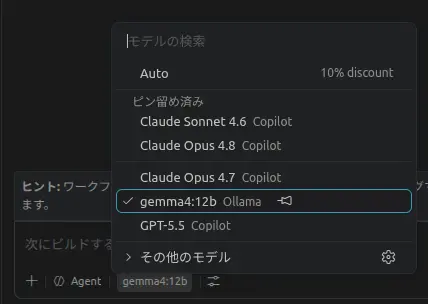
レスポンスでエラー
試しに GitHub Copilot Chat から gemma4:12b にメッセージを送ると以下のエラーが返ってきました。
Sorry, your request failed. Please try again.

Client Request Id: 11cba335-5cfd-41d2-93ac-26d191e904f8

Reason: Response too long.: Error: Response too long. at _G._provideLanguageModelResponse (/usr/share/code/resources/app/extensions/copilot/dist/extension.js:1710:13790) at process.processTicksAndRejections (node:internal/process/task_queues:104:5) at async _G.provideLanguageModelResponse (/usr/share/code/resources/app/extensions/copilot/dist/extension.js:1710:14793)
GitHub Copilot Chat の Local Models 機能はまだ比較的新しく、上手くいかない等の報告も多数あるようです。
なので、GitHub Copilot Chat から使うのは諦めて、後述の continue を使いました。
Continue から使う
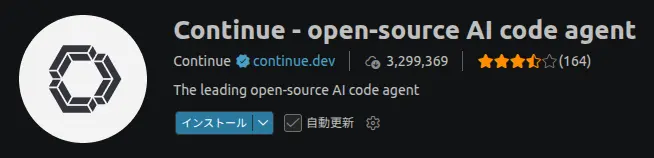
VS Code の拡張機能から Continue をインストールします。
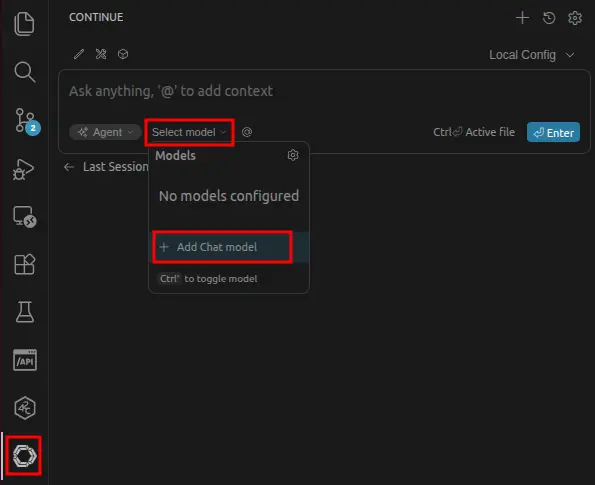
インストールしたらサイドバーにアイコンが追加されるので、クリックします。Select model から Add Chat model を選択します。
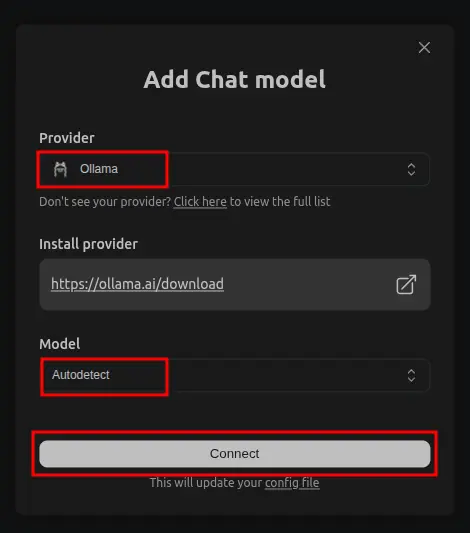
以下のように選択肢、Connect を押します。
- Provider: Ollama
- Model: Autodetect
すると、モデルで gemma4:12b が選択できるようになっています。
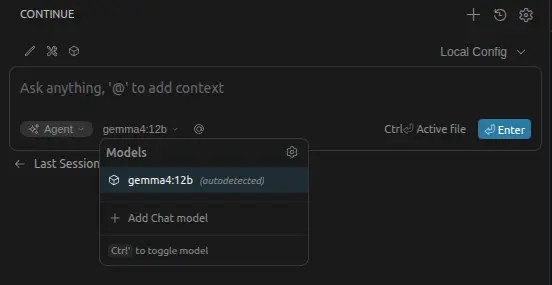
これで使えるようになります。
モデルのロード・アンロードについて
Ollama は、リクエストが来るとモデルをメモリにロードし、一定時間使われなければ自動でアンロードするそうです。
公式FAQでは、デフォルトではモデルはメモリ上に5分保持され、その後アンロードされると説明されています。